Here's the thing: if you're an educator, people will Google you. Your students, their parents, prospective employers will all be checking you out digitally...and the higher you go in leadership roles, the more likely people will be to look you up online.
While there's no way to escape the Google search bar, there is a way to control what people see when they look you up. Google is the most popular search engine, and it has certain algorithms. It's going to pull from certain websites first, and the good news is that it's often going to be the ones that you can control first.
For instance, this is what you get when you Google me: Kate Wolfe Maxlow.
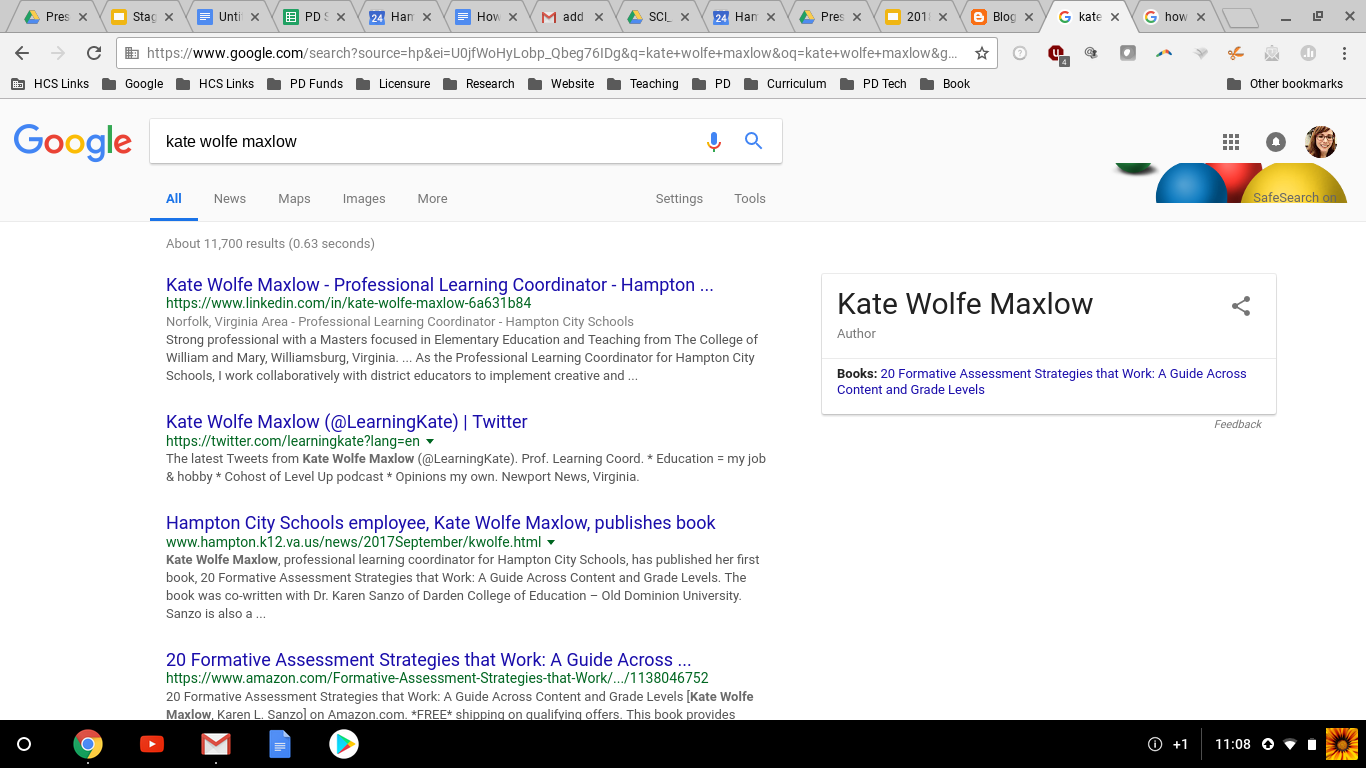
Unless you're making headlines that get clicked on a lot, Google is often going to post links for major social media sites first. It especially likes LinkedIn, Twitter, and Facebook, which is why we're going to discuss those in this article. The question is: how can you ensure that you're putting your best digital foot forward?
1. Make sure you have a LinkedIn Profile.
What is it?LinkedIn a basically an online resume that also has some social media functionality. It's supposed to help professionals connect with one another, and it has some direct messages capability if you want to reach out to someone.
What's the bare minimum I should do?
You don't have to pay for a LinkedIn Profile (though LinkedIn would love it if you did and will bug you to do so). At the very least, have a decent profile pic, your major jobs in the educational field, and a quick summary about yourself that epitomizes your main accomplishments and major beliefs about education, using links where it makes sense. For instance, I have a link to my book on Amazon and to a project I did with the Virginia Department of Education. I want people to be able to easily click on those when they search for me. You can see my LinkedIn Profile here.
You can also post updates like you would with Twitter or Facebook, but it's not really necessary unless you're working as a consultant or a similar job where you're doing everything you can to connect to other educators.
How often do I need to update it?
I go in about once a month or so and check out who's invited me to link with them. I go in about quarterly and update my profile. If you're on the hunt for a new job, you probably want to go into your account more more often.
2. Create and Keep Up Your Twitter Account
What is it?Twitter is social media site that allows you to post short thoughts (280 characters or less per "tweet"), "retweet" others' thoughts, and reply to others' tweets. There's also some Direct Message capabilities. You can attach links or images to your tweets for more impact. You can also "tweet at" people by including their username in your tweet. For instance, you would tweet at me by including @LearningKate in your tweet. Twitter will tell me that you tweeted at me, and now my followers as well as yours will see your tweet.
You can also use hashtags that allow others to find your tweets more easily or participate in Twitter chats. For instance, you might at #lovemyschoolday2018 to your tweet, and then anyone who searches for that hashtag will easily be able to find your tweet.
What's the bare minimum I should do?
Before my second kid, I used to do Twitter chats and direct messages and all of it. Bar none, Twitter chats are the best way to increase your Twitter followers.
Now I prefer sleep. Here's how I stay on top of my Twitter game while doing the bare minimum:
- I use Tweetdeck.com. Tweetdeck allows you to schedule tweets in advance and easily search for people or topics you want to keep track of. You can also manage multiple accounts from Tweetdeck, so you can manage both your personal account and your organization's account without having to log in and log out. You can see my Tweetdeck below. It has my notifications, my scheduled Tweets, and my home organization, Hampton City Schools
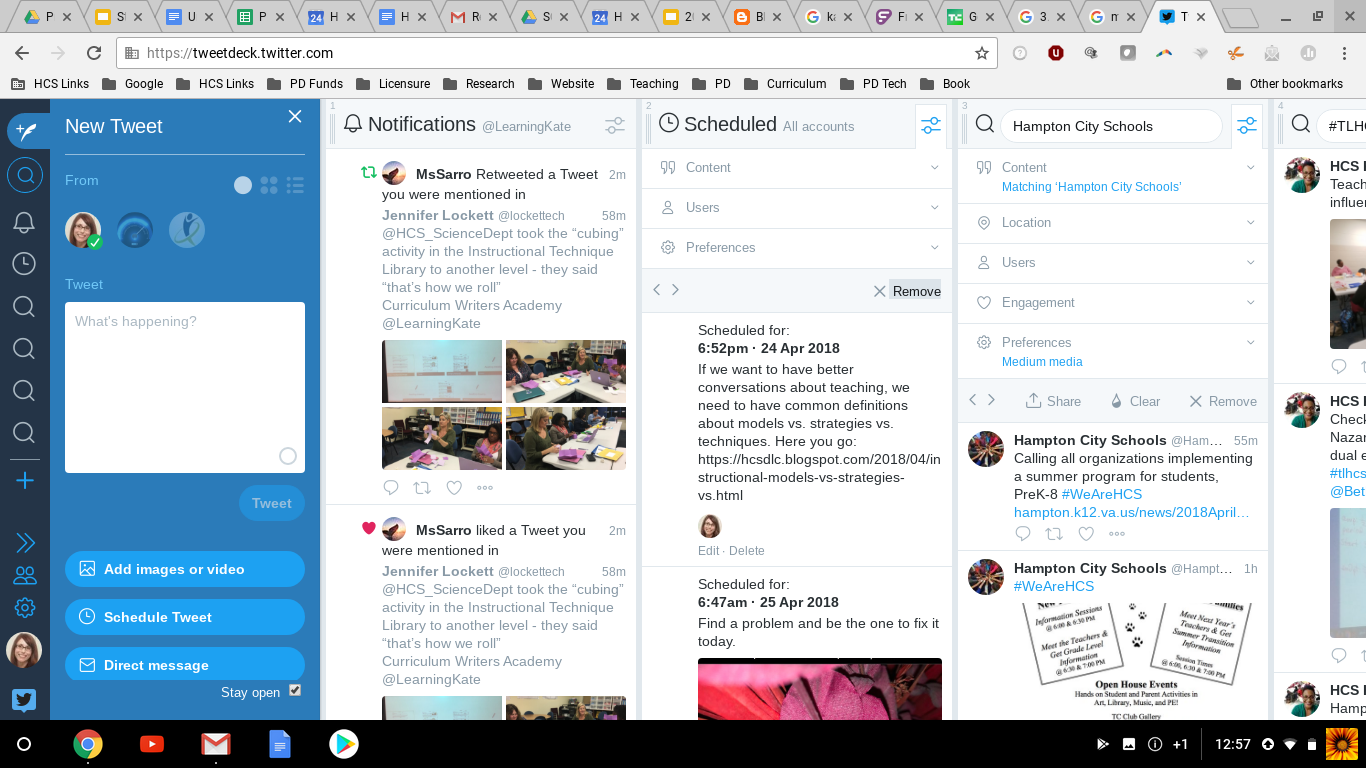
- I go in once a week, usually on Monday, and schedule my Tweets for the rest of the week. Twitter usage spikes during morning and afternoon commute times, so I usually schedule my tweets for random times from 6am-8am and 4pm-7pm. These scheduled tweets are usually thoughts or links to this blog with evocative questions. You can see examples if you check out my Twitter feed, @LearningKate. This only takes me about 15 minutes to set them up for the week.
- I mostly only follow other educators from my @LearningKate account and it's the one associated with my actual name. This ensures that when people Google me, that's one of the first things they see. It also keeps me up-to-date on the latest happenings in education.
- Every morning, I go in while brushing my teeth or drinking my coffee and I scroll through others' Tweets. If I like something, I retweet it. If I can think of my own comment to go with it, I add it, but if not, I don't stress about it. I only heart things that I really like and want to easily be able to find later. This takes me about 5-10 minutes.
- If I were an administrator or teacher, I would take at least 1 pic of the young people in my school or class each day and have a set time that I post it. For instance, when I get into the car on my way to go home, I would know that before I start the car, I post my picture.
3. Lock down your personal Facebook account.
What is it?
Facebook is a social media site that allows you to post pictures or thoughts, interact in groups, create events, and much more. Most adults these days are going to have a personal Facebook account, and you might also run one for your organization.
What's the bare minimum I should do?
While you might also have a page for your organization, the most important thing about Facebook is to make sure that it's locked down. What does this mean?
- Consider using a pseudonym that's similar enough to your name without allowing your students to find you. The most common version of this I see is the First Name Middle Name version (for instance, I was Kate Elizabeth for awhile).
- Go through ALL your old profile and cover pics, because the default settings for these is usually Public. If you have old profile pics from college with you engaged in questionable activities, you might want to remove them.
- I personally don't post much other than pictures of my kids. What you choose to post on Facebook is every educator's choice, but if you're going to move into educational leadership, the best choice is not to post anything remotely controversial. Even if you've locked down your account, screenshots are all too easy these days and can be passed around even if people don't have access to your account.
What other thoughts and ideas about establishing yourself digitally? Post them in the comments below.


